Six numbers that run the business.
Against the previous period, with a one-line briefing.
- Revenue
- ROAS & MER
- CAC
See which ad earned each payment, on your own server.
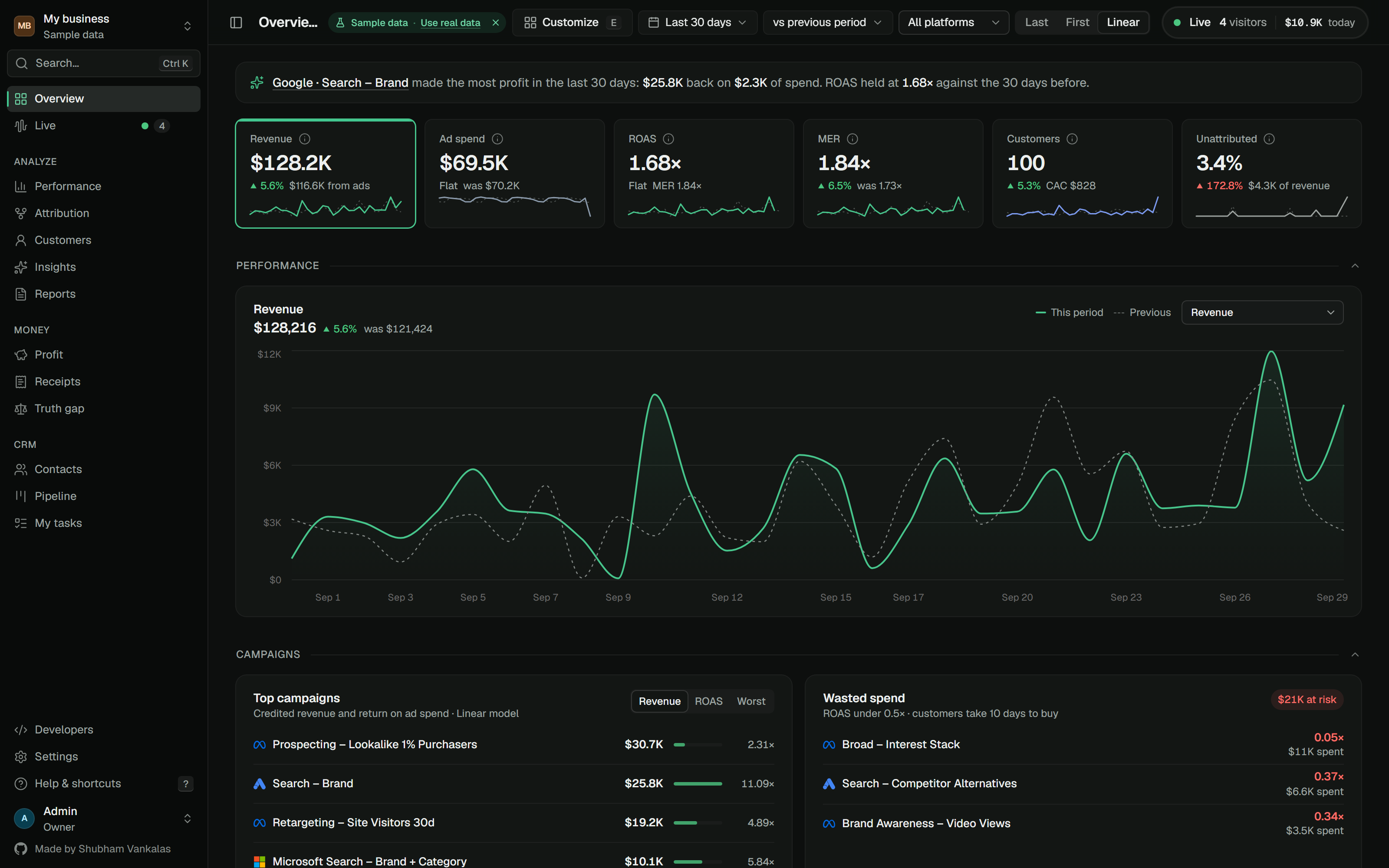
Real screens from the demo workspace, taken apart.
Against the previous period, with a one-line briefing.
This period drawn over the last one, for any range.
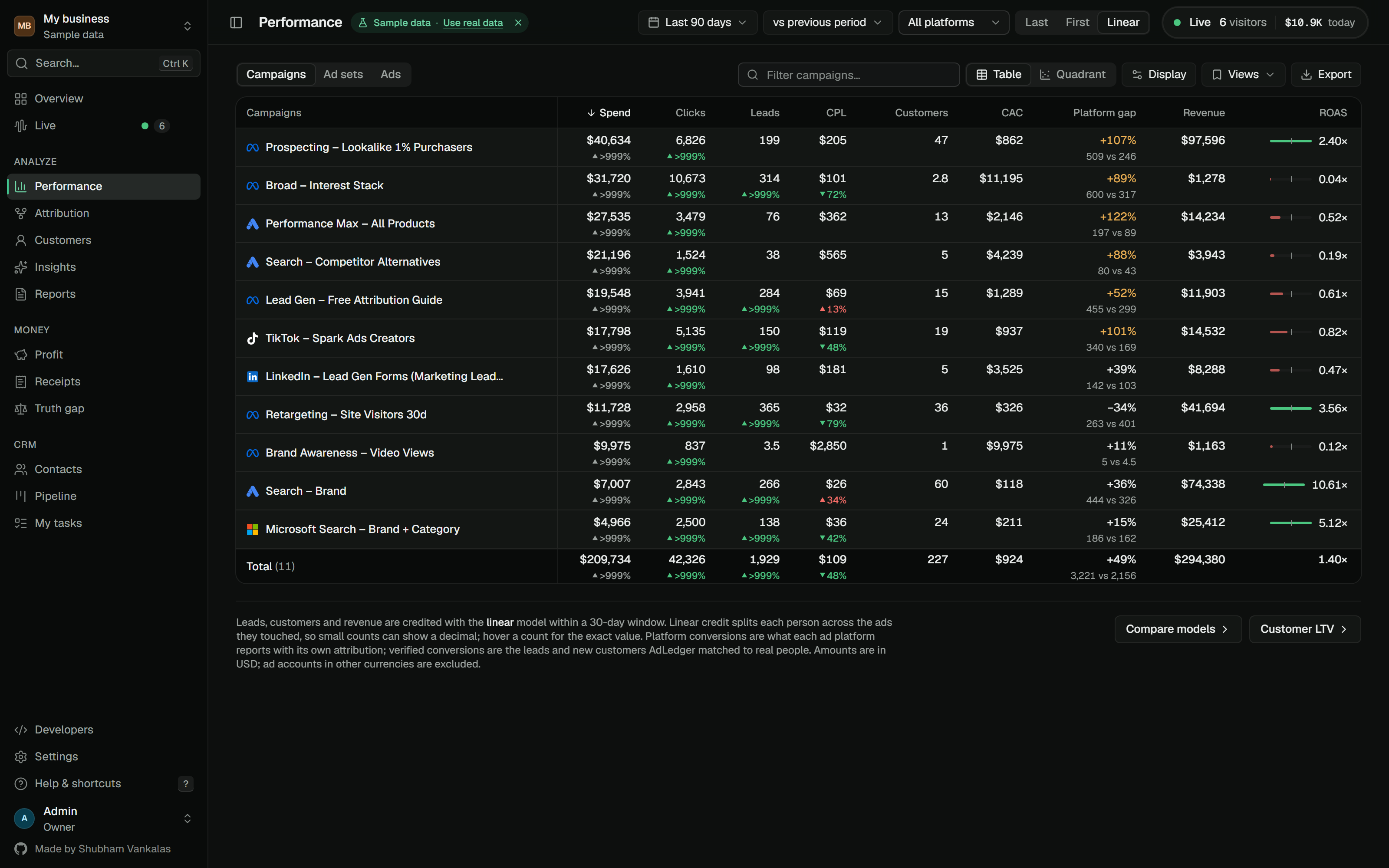
Spend to revenue, down to the single ad.
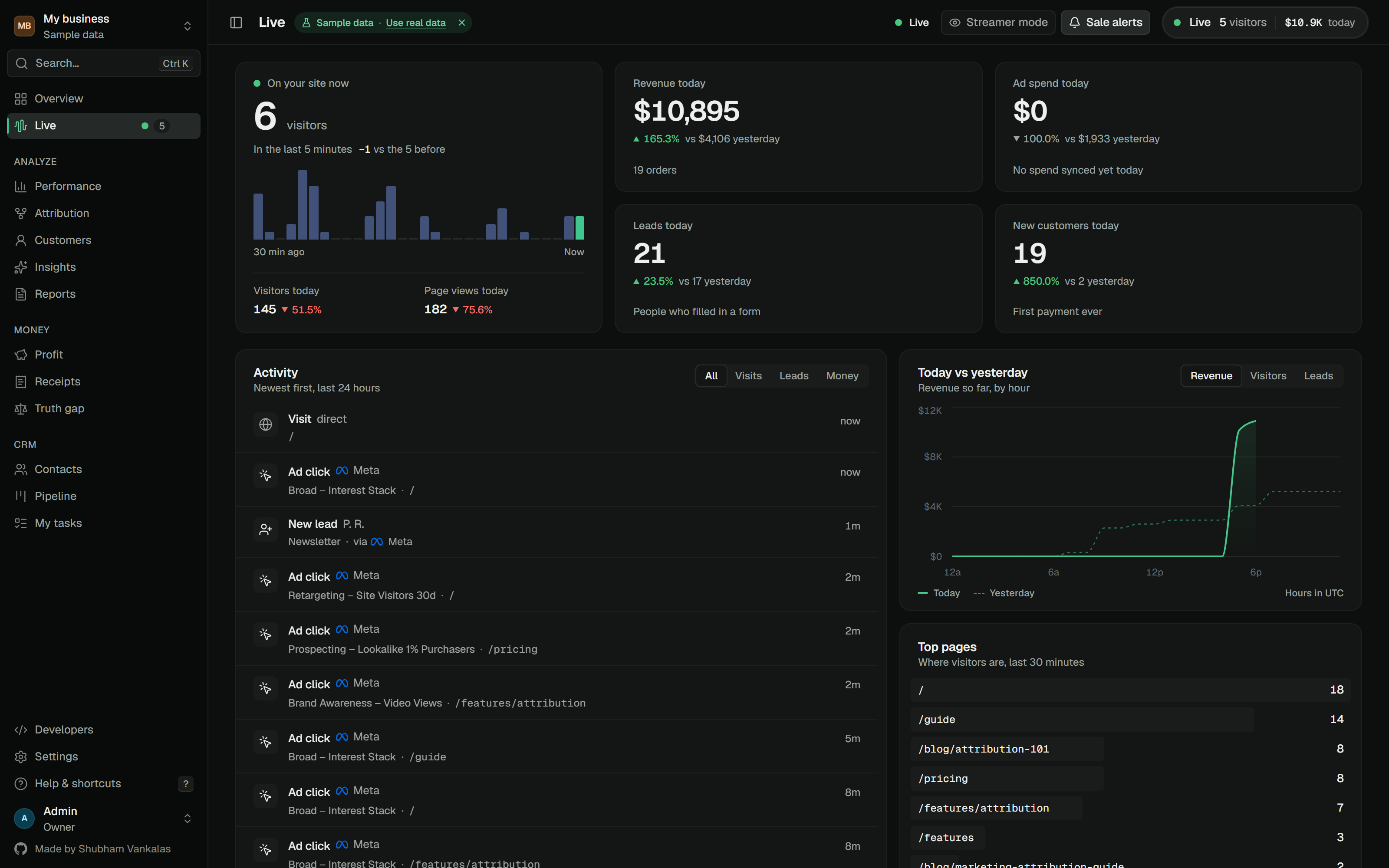
Clicks, leads and payments as they happen.
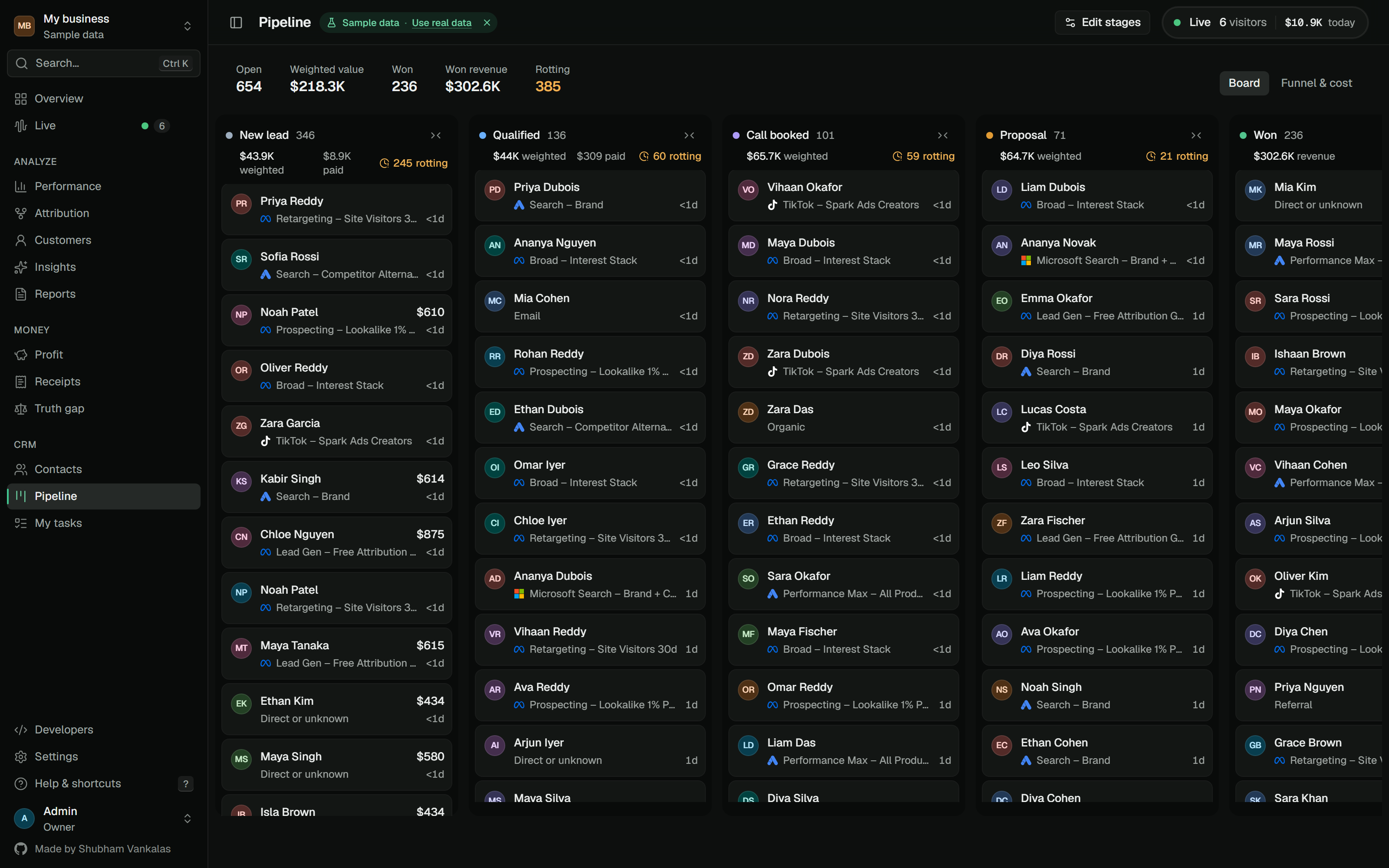
A pipeline tied to the click that started it.
Branded PDFs from the same SQL as the dashboard.
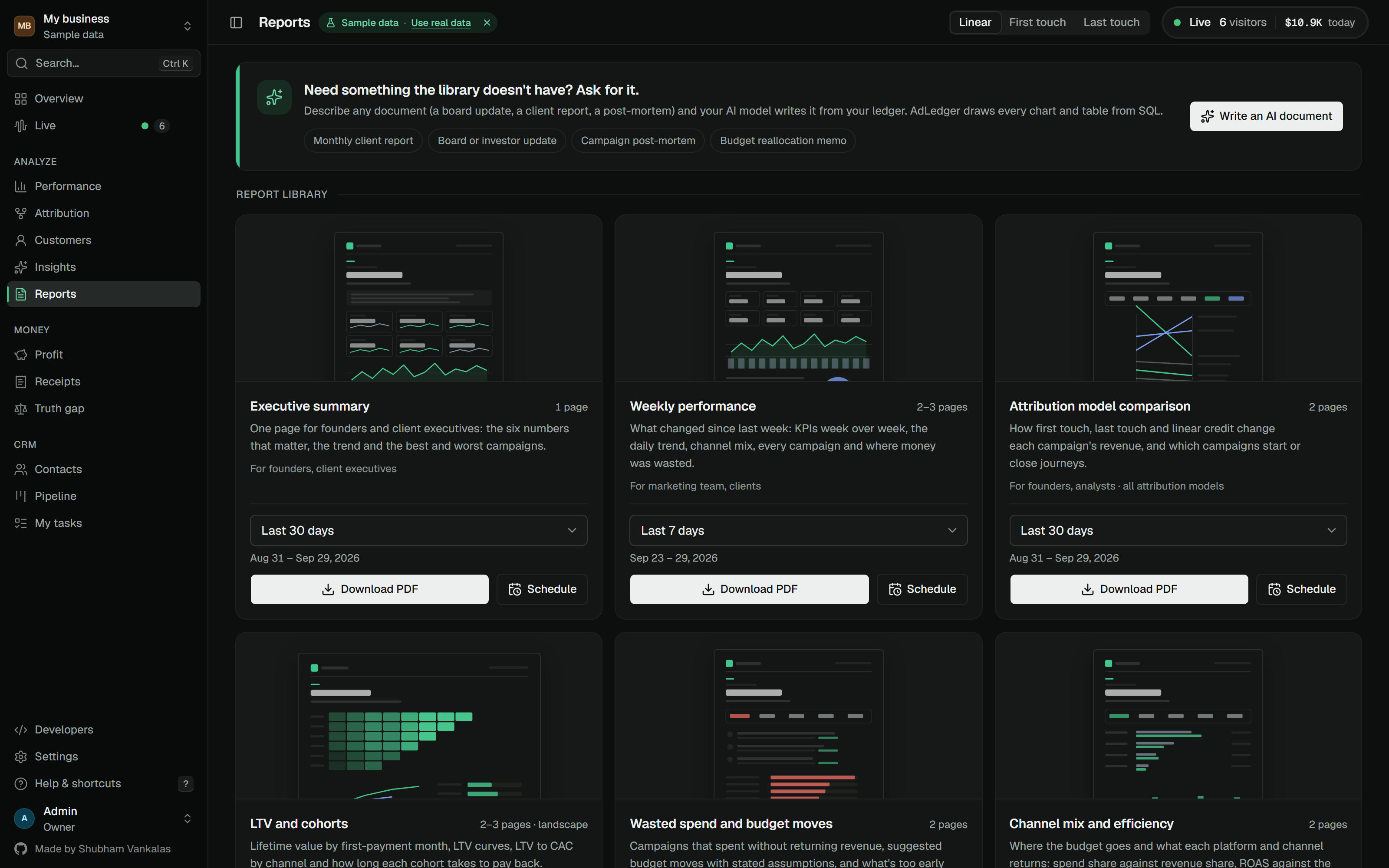
Answers read from your ledger, never invented.
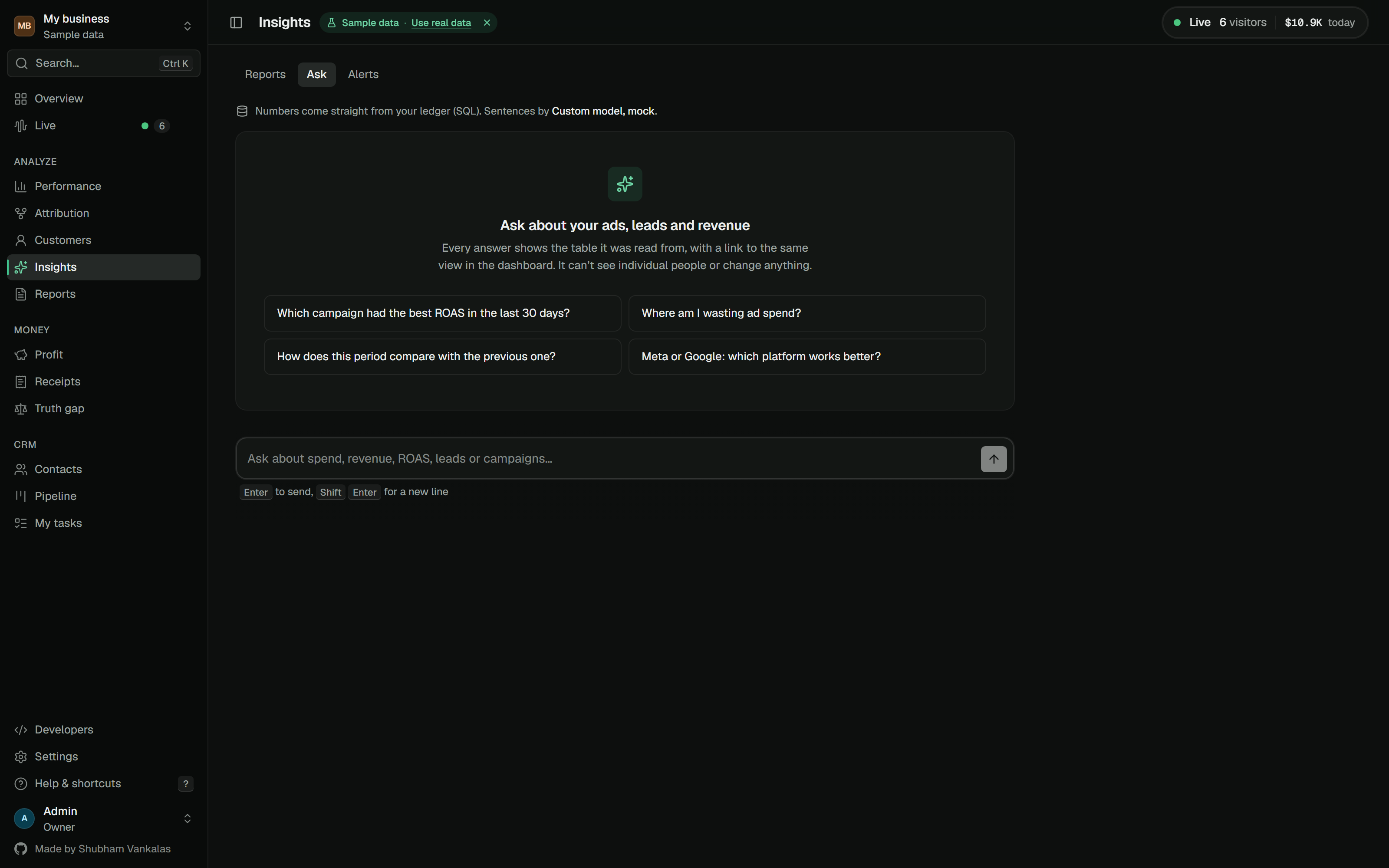
On by default, free for everyone.
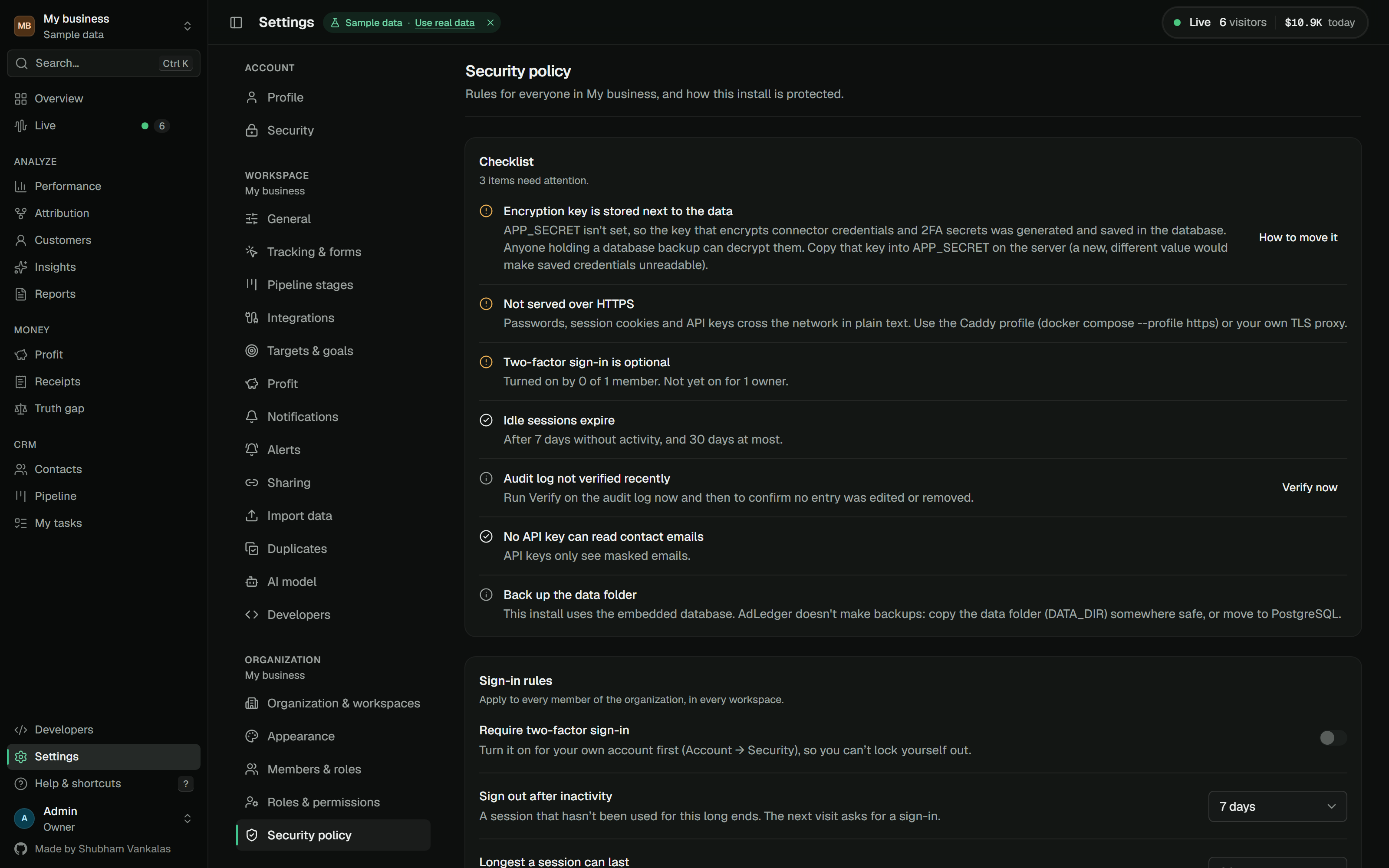
One ledger, on a server you control.
Ad platforms grade their own homework. AdLedger checks it against your bank.
Every payment shows the ads that earned it.
Platform claims, checked against real payments.
After refunds, fees and cost of goods.
Hear about a bad day before the invoice does.
Every lead remembers the ad that brought it.
Every number is one request away.
Every integration has a demo mode. Brand marks from Simple Icons (CC0); trademarks belong to their owners. Connectors other than Meta, Google Ads and Stripe are in beta.
No certification badges: you run AdLedger, so the audit is yours. Compliance mapping · Trust & Security
Every path ends in your browser. No config files.
Render or Railway, next to a managed database.
On Render
render.yaml: a web service, a PostgreSQL 16 database and a randomly generated APP_SECRET. Pick a name and apply it./api/v1/health passes..onrender.com address and create your owner account. Choose Explore with demo data to look around first.On Railway
railway.json tells Railway to build the Dockerfile and watch /api/v1/health.DATABASE_URL=${{Postgres.DATABASE_URL}}APP_SECRET to a long random value, so the encryption key isn’t stored next to your data. Render generates one for you.The easiest way to try it for real.
docker compose up -d
adledger-main), or clone it with Git:
git clone https://github.com/ShubhamVankalas/adledger
cd and a space, drag the folder into the window and press Return.docker compose up -d
docker compose stop and docker compose start. Your data stays in a Docker volume.docker compose pull then docker compose up -d. Migrations run on start.ADMIN_EMAIL=admin@example.com \ ADMIN_PASSWORD=adledger-demo-123 \ DEMO_DATA=true docker compose up -d
With free HTTPS, on 1 GB of RAM.
curl -fsSL https://raw.githubusercontent.com/ShubhamVankalas/adledger/main/install.sh | DOMAIN=ads.yourcompany.com sh
ads.yourcompany.com, pointing at your server’s IP address. Do this first so the HTTPS certificate can be issued.curl -fsSL https://get.docker.com | sh
curl -fsSL https://raw.githubusercontent.com/ShubhamVankalas/adledger/main/install.sh | DOMAIN=ads.yourcompany.com sh
https://ads.yourcompany.com and create your account../adledger with docker-compose.yml and a .env of random secrets, starts PostgreSQL, AdLedger and Caddy, and gets a free Let’s Encrypt certificate.DOMAIN= to run on http://SERVER-IP:3000 for a trial.docker compose pull and docker compose up -d in ./adledger.APP_SECRET somewhere else.t.yourshop.com, so cookies are first-party.One Node process with an embedded database.
pnpm install && pnpm dev
corepack enable provides pnpm if you don’t have it.
git clone https://github.com/ShubhamVankalas/adledger
cd adledger
corepack enable
pnpm install
DATABASE_URL, it uses an embedded PostgreSQL (PGlite) in ./.data.
pnpm dev
.env.example: DATABASE_URL for your own Postgres, CONNECTOR_MODE=mock for mock connectors, LLM_MODEL for an AI model.TEST_DATABASE_URL to use a real one.
pnpm lint && pnpm typecheck && pnpm test
docker compose up -d --build builds the production container locally.It stays on your server. AdLedger has no telemetry and sends nothing to us. The only outside calls are the ones you set up: ad platform syncs, payment backfills, notifications, and your AI model if you pick a cloud one.
Raw emails are kept in one table. Everywhere else, emails and phone numbers are stored as SHA-256 hashes. IP addresses are shortened before storage, the pixel doesn't fingerprint, and connector credentials are encrypted at rest. The pixel supports consent (adledger.consent(false)) and Do-Not-Track.
The AI model only sees campaign totals, never contacts. The MCP server is read-only and masks emails. As with any analytics tool, mention it in your privacy notice and cookie banner.
Mostly, because it doesn't rely on what Apple restricted. App Tracking Transparency limits tracking across apps, which hurts the ad platforms' own pixels. AdLedger uses a first-party pixel on your own site and gets payments straight from Stripe or your store by webhook, so a sale is recorded even when the ad platform can't see it.
Some limits remain. Safari keeps cookies set by scripts for 7 days at most, so if someone clicks an ad and comes back more than a week later without having filled in a form, the first click can be missed. Safari's Link Tracking Protection also strips click IDs such as gclid and fbclid in Mail, Messages and Private Browsing. UTM parameters are kept, which is why the recommended UTM templates carry campaign and ad IDs. Serving AdLedger from a subdomain of your site keeps the cookie first-party and makes ad blockers less likely to block it.
Exact about the money it can see, and open about what it can't. Every payment is stored to the cent, and split credit always adds up to the payment.
It counts clicks, not views. Someone who saw an ad and later typed your address directly isn't credited to that ad, and there are no estimated or modelled conversions. So your numbers won't match Meta's or Google's reports, which include view-throughs, modelled conversions and their own attribution windows. Ad blockers and strict browsers can hide some visits. Journeys across devices are joined only when the person leaves the same email (or phone number) on each one. Revenue without a tracked click is shown as unattributed rather than guessed.
There are three rule-based models (first touch, last touch and linear), with no data-driven model yet. Ad and payment connectors other than Meta, Google Ads and Stripe are in beta.
The software is free to self-host (source available under FSL-1.1), with no per-seat or revenue-based pricing. You pay only for where it runs. It needs about 1 GB of RAM, which a small VPS covers for a few dollars a month. Render and Railway work too, at their own prices.
Your laptop is fine for trying it, but the pixel and payment webhooks need a public HTTPS address, so use a server for real tracking. The one-line installer sets up HTTPS for free. AI is optional: Ollama or LM Studio costs nothing, and a cloud model costs whatever its provider charges for one short note a week.
AdLedger is source available under the Functional Source License (FSL-1.1-ALv2). You can install it, use it for your own business and read or change the code, all for free. You can't sell it or offer it as a competing product or hosted service. Two years after each release, that version becomes Apache-2.0. It is not an OSI-approved open source licence.
Not to try it. The demo workspace fakes every integration, so you can explore everything first.
For real data, payment tools mostly need no developer account: you paste a key or webhook secret from the dashboard (for Stripe, one restricted key). PayPal is the exception, and needs a free REST app at developer.paypal.com. Ad platforms are stricter. Meta needs a free Business app to create a token with ads_read. Google Ads and Microsoft Ads need a developer token, and X needs Ads API access for your app. Google's and X's approvals can take a few days, so apply early. TikTok, LinkedIn, Pinterest, Snapchat and Reddit each need a free developer app. Each integration card in the app walks you through the steps.
Want to skip all of that? Export spend as a CSV from any ads manager and upload it, or send it to the Spend API.
No badges, on purpose. SOC 2 and ISO 27001 audit an organisation running a service, not a codebase. When you self-host AdLedger, you are the data controller, so there is nothing for us to certify.
What we can say: AdLedger is GDPR-ready and ships SOC 2-aligned controls, with a mapping to ISO 27001 themes. It is built to help you meet GDPR, UK GDPR, CCPA/CPRA, ePrivacy and PECR, and India’s DPDP. It is not designed for health data, card data or children’s data. The details are in the compliance mapping and on the Trust & Security page.